



In the past, fixing blurry photos often meant spending hours in Photoshop or Lightroom, adjusting layers, filters, and masks. But now, thanks to AI-powered tools, enhancing blurry photos has become quick, simple, and beginner-friendly. With just a few clicks, you can turn a fuzzy memory into a crystal-clear picture.
Why Are Your Photos Blurry?
- Camera focus issues: The subject wasn’t focused properly.
- Low light conditions: Poor lighting can cause the camera to struggle.
- Hand shake or motion blur: Movement during capture leads to blur.
Quickest Way: Enhance Blurry Photo with AI Tools
AI photo enhancement tools use advanced algorithms to analyze blurry images and restore lost details. Instead of manually tweaking sharpness, contrast, or filters, these tools automatically enhance photos in just seconds. Whether it’s a selfie, landscape, or family picture, AI can quickly transform a blurry photo into a clear, high-quality image.
Top AI Photo Enhancer Software
1. HitPaw FotorPea – Fix for Blurry Photos with One-Click
HitPaw FotorPea is one of the most powerful AI photo enhancers designed to make blurry photos sharp again in seconds. You can Choose from 10 enhancement models like Face, Sharpen, Upscale, and Colorize to fix different photo issues.

Step-by-Step Guide: Enhance Blurry Photo
let’s walk through a simple example using HitPaw FotorPea, one of the fastest and most effective AI photo enhancers available.
Step 1: Download and Install HitPaw FotorPea
Go to the official HitPaw FotorPea website and download the program for your computer. Installation only takes a few minutes, and you don’t need any technical setup. Once it’s installed, launch the software.
Step 2: Click “Import the Photo”
Import your blurry photo into HitPaw FotorPea by dragging and dropping it into the workspace. Next, click “Import” to let the AI start analyzing the image.
HitPaw offers multiple enhancement models, Simply select the model that best matches your photo’s needs. Such as Face Modelis designed for selfies and portraits, sharpen Model improves edges and removes softness. Upscale Model help you to increase resolution up to 8K. And the Colorize Model could restores old black-and-white images.
Step 3: Preview and Export the Clear Image
When you’re satisfied with the result, click Export to save the image in your preferred format.
And that’s it! With just three simple steps, you can enhance a blurry photo without spending hours in Photoshop.
2. Remini – Fix Blurry Photos Fast
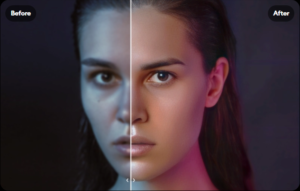
A popular AI blurry photo enhancer that works especially well on portraits and selfies, making them look crisp and professional. It’s widely used on mobile apps for quick enhancements. With Remini, you can restore old, low-quality images and even improve videos for clearer playback.
3. Fotor – Enhance Blurry Photos Online
A simple online photo enhancer that lets you sharpen and clear photos directly in your browser. No installation is needed, making it perfect for quick edits. Fotor also provides extra features like filters, cropping, and retouching, so you can polish your photo beyond just deblurring.
4. Pixlr – Free Blur Photo Editor
A free AI blurry photo enhancer with quick editing features for sharpening and adjusting image clarity. It’s lightweight, easy to use, and accessible both online and via mobile. Pixlr is ideal for beginners who want a no-cost solution to enhance photo blurry images on the go.

5. Let’s Enhance – Upscale Blurry Photos
Known for its AI image enhancer for blurry photos, this tool boosts resolution and sharpness while preserving natural details. It’s especially popular for printing or professional use where high-resolution images are required. Let’s Enhance also supports batch editing, saving time when working with multiple blurry shots.

Tips to Avoid Blurry Photos
While AI tools are excellent for fixing blurry photos after the fact, the best approach is to avoid blur in the first place. A few simple techniques can drastically improve your chances of capturing sharp, professional-looking images:
- Use a tripod or stabilizer – Keeping your camera steady is the easiest way to prevent unwanted blur. This is especially helpful in low-light situations where the camera naturally slows the shutter speed.
- Ensure sufficient lighting – Bright, even lighting helps the lens focus more accurately and reduces noise, making your photos clearer from the start. Natural light is ideal, but a small LED light can make a big difference indoors.
- Increase shutter speed – A faster shutter freezes motion, which is essential when photographing kids, pets, or sports. Even small adjustments can make moving subjects much sharper.
- Use burst mode for moving subjects – Taking several shots in quick succession increases the chances of at least one perfectly sharp image. This is particularly useful for action shots or candid moments.
By combining these preventive measures with the power of AI blurry photo enhancers, you can ensure your photos look crisp and professional every time—whether they’re brand-new shots or older pictures in need of repair.
FAQs
1. Can I make a blurry photo clearer for free?
Yes, some tools like Fotor, Pixlr, and Remini offer free AI blurry photo enhancers that can improve clarity. However, free versions may have limitations, such as watermarks, lower resolution output, or restricted usage. For professional-quality results without restrictions, premium software like HitPaw FotorPea is recommended.
2. What’s the best AI tool to enhance a blurry photo?
The right tool depends on what you’re trying to improve. HitPaw FotorPea is a solid all-around option, with multiple AI models, batch processing, and support for up to 8K upscaling. It’s often chosen for its balance of speed, flexibility, and output quality.
3. How can I enhance old family photos?
Old photos often suffer from blur, fading, and discoloration. An AI photo enhancer blurbuster like HitPaw FotorPea can restore these images by sharpening details, colorizing black-and-white pictures, and improving resolution. Simply scan your old photo, import it into the software, and let the AI bring it back to life.
Final Thoughts
Enhancing blurry photos is no longer a technical challenge. With the rise of AI blurry photo enhancers, anyone can restore image quality in seconds. Among the options available, HitPaw FotorPea provides the most complete set of tools—covering everything from portraits to landscapes to old photographs.
Whether you need to enhance a blurry photo for social media, restore family memories, or improve professional images, AI tools are the fastest and most effective solution today.
